# Stacked toasts
Published: August 21, 2025
Version: ^2.2.5
You've asked, we've listened. Flux toasts can now stack! When multiple notifications appear at once, they'll overlap intelligently, expanding on hover to reveal each message—giving your users a more organized notification experience.
Let's take a look.
## Getting started
The new `flux:toast.group` component wraps your regular toast component to enable stacking. Just wrap your toast component in a group:
```blade
```
That's it! Your toasts will now automatically stack when multiple notifications appear. The default behavior shows them slightly overlapped, creating a clean visual hierarchy that doesn't overwhelm the screen.
## Hover to expand
When you hover over a stack of toasts, they'll expand to show each notification in full. Even better, the dismissal timer pauses while the stack is expanded, so your messages won't disappear while users are reading them.
This ensures users can quickly scan multiple notifications without the stress of them vanishing mid-read. Once you move your cursor away, the stack collapses back to its compact state and the timers resume.
## Always expanded
Sometimes you want all your toasts visible at once—no hovering required. For those cases, we've added the `expanded` prop:
```blade
```
With `expanded` set to true, your toast stack will always show each notification in full, perfect for applications where users need to see all messages immediately.
## Position control
Just like individual toasts, the group component respects positioning. Want your stack in the top corner? No problem:
```blade
```
The group handles all the positioning logic, ensuring your toasts animate correctly whether they're sliding up from the bottom or sliding in from the top.
## Bon Appétit
The stacking animation is smooth and natural. The hover interaction feels responsive. The spacing between toasts is just right. And of course, it all works seamlessly with the existing toast API—no changes needed to your `Flux::toast()` calls.
Enjoy!
[Check out the toast docs →](https://fluxui.dev/components/toast#stack)
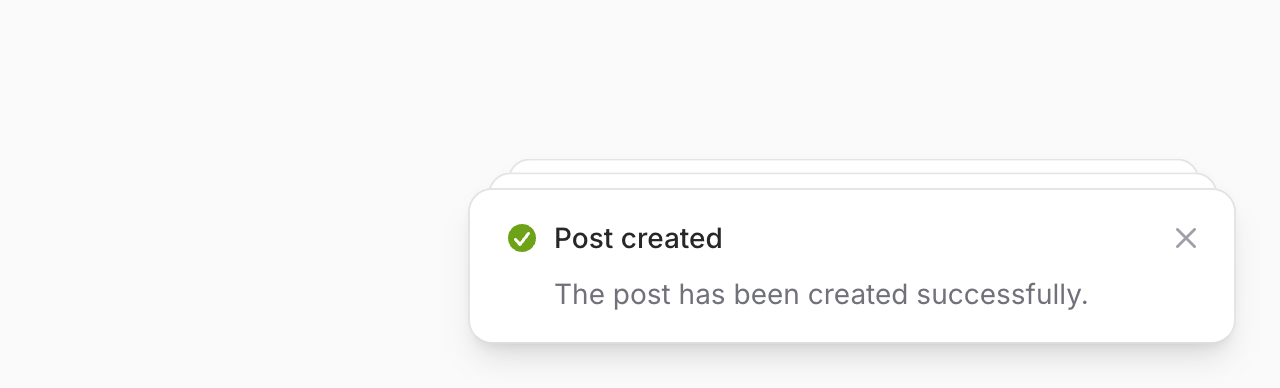 You've asked, we've listened. Flux toasts can now stack! When multiple notifications appear at once, they'll overlap intelligently, expanding on hover to reveal each message—giving your users a more organized notification experience.
Let's take a look.
## Getting started
The new `flux:toast.group` component wraps your regular toast component to enable stacking. Just wrap your toast component in a group:
```blade
You've asked, we've listened. Flux toasts can now stack! When multiple notifications appear at once, they'll overlap intelligently, expanding on hover to reveal each message—giving your users a more organized notification experience.
Let's take a look.
## Getting started
The new `flux:toast.group` component wraps your regular toast component to enable stacking. Just wrap your toast component in a group:
```blade