# Sticky table headers + columns
Published: October 8, 2025
Version: ^2.5.1
 Flux tables now support sticky headers and sticky columns, making it easy to keep important information visible while users scroll through large datasets.
Let's take a look.
## Sticky headers
Keep column headers visible during vertical scrolling by adding the `sticky` prop to your `table.columns` component:
```blade
Customer
Date
Status
Amount
```
The background color on the header row prevents content overlap as rows scroll underneath. The `container:class` prop lets you set a maximum height for your table, creating a scrollable area while keeping the headers locked in place.
[Read more about sticky headers →](/components/table#sticky-header)
## Sticky columns
Flux tables now support sticky headers and sticky columns, making it easy to keep important information visible while users scroll through large datasets.
Let's take a look.
## Sticky headers
Keep column headers visible during vertical scrolling by adding the `sticky` prop to your `table.columns` component:
```blade
Customer
Date
Status
Amount
```
The background color on the header row prevents content overlap as rows scroll underneath. The `container:class` prop lets you set a maximum height for your table, creating a scrollable area while keeping the headers locked in place.
[Read more about sticky headers →](/components/table#sticky-header)
## Sticky columns
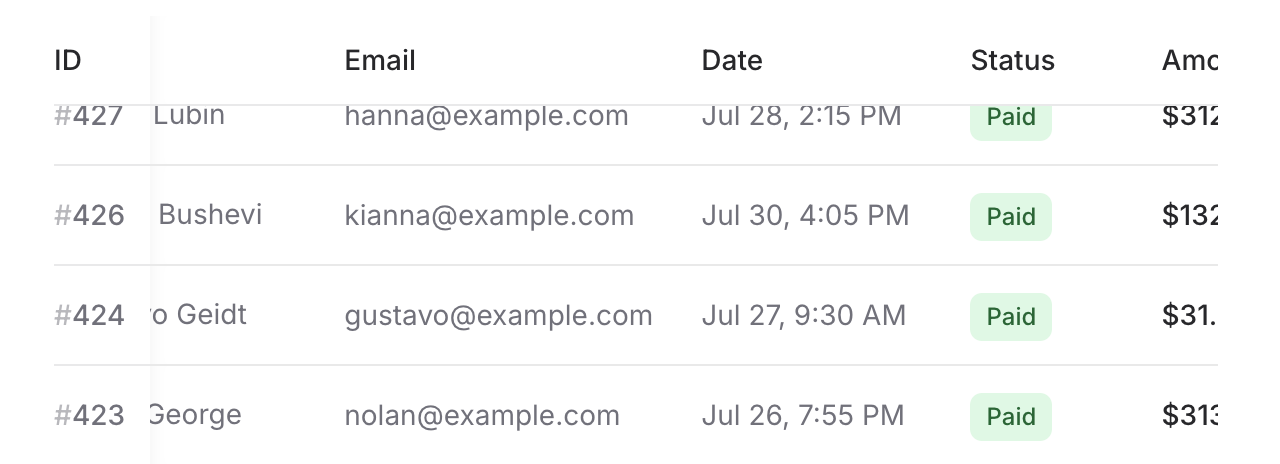 Keep important columns visible during horizontal scrolling by adding the `sticky` prop to individual `table.column` and `table.cell` components. Combine it with sticky headers for a spreadsheet-like experience:
```blade
ID
Customer
Email
@foreach ($this->orders as $order)
{{ $order->id }}
{{ $order->customer }}
{{ $order->email }}
@endforeach
```
Apply `sticky` to both the column header and the corresponding cells in each row. Add background colors to prevent content overlap, and we'll automatically add a subtle shadow when scrolling to help users see that the column is overlaying content underneath.
[Learn more about sticky columns →](/components/table#sticky-columns)
---
Check out the [Table documentation](https://fluxui.dev/components/table) for complete examples and API reference.
Keep important columns visible during horizontal scrolling by adding the `sticky` prop to individual `table.column` and `table.cell` components. Combine it with sticky headers for a spreadsheet-like experience:
```blade
ID
Customer
Email
@foreach ($this->orders as $order)
{{ $order->id }}
{{ $order->customer }}
{{ $order->email }}
@endforeach
```
Apply `sticky` to both the column header and the corresponding cells in each row. Add background colors to prevent content overlap, and we'll automatically add a subtle shadow when scrolling to help users see that the column is overlaying content underneath.
[Learn more about sticky columns →](/components/table#sticky-columns)
---
Check out the [Table documentation](https://fluxui.dev/components/table) for complete examples and API reference.