The Changelog
What's new around here?
Succinct and informative updates about Flux.
June 4, 2026
Carousel
Version ^2.15.0

Flux now ships with a Carousel component. Image galleries, testimonial rotators, product showcases, featured listings — whatever you need to scroll through, it's ready to go.
Let's take a look.
Snap and scroll
Drop in a flux:carousel with as many slides as you need. Each slide snaps into place naturally, and arrow controls appear automatically — they even hide themselves when you've reached either end:
Copy to clipboard
<flux:carousel> <flux:carousel.slide class="w-full"> <img src="/img/seascape.png" class="aspect-16/9 rounded-lg object-cover" /> </flux:carousel.slide> <flux:carousel.slide class="w-full"> <img src="/img/woodscape.png" class="aspect-16/9 rounded-lg object-cover" /> </flux:carousel.slide> <!-- ... --></flux:carousel>Slides can be any width — w-full for a single-slide gallery, w-1/3 for a multi-card layout, or responsive classes like w-4/5 sm:w-1/2 md:w-1/3 to adapt across breakpoints.
External controls
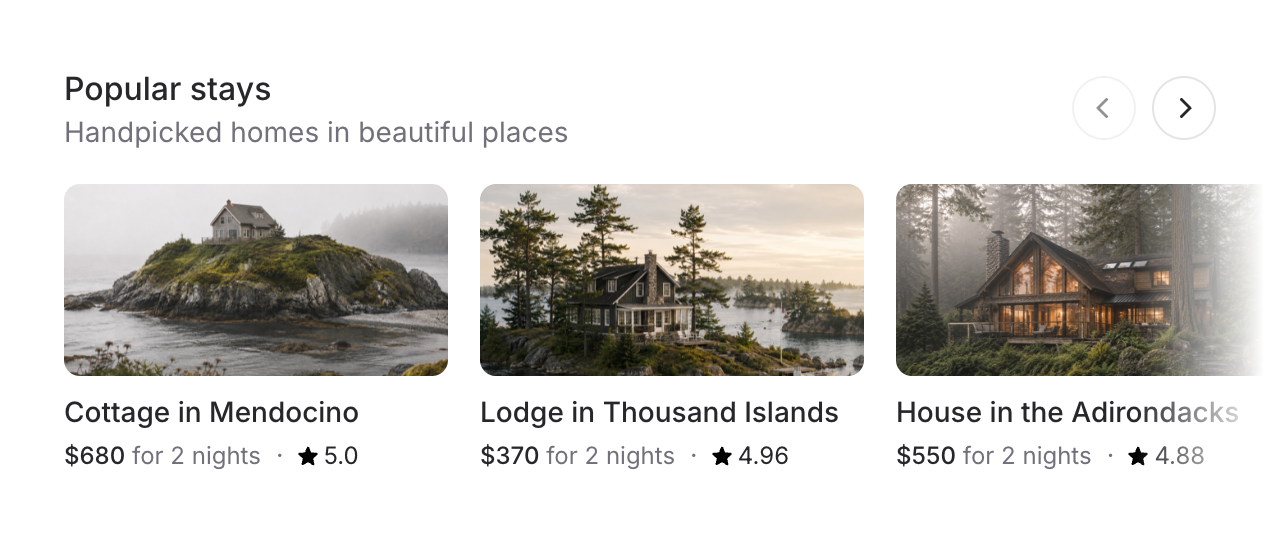
For layouts like featured listings or product rows, you probably don't want arrow buttons floating over your content. Use a shared name to place controls anywhere on the page:
Copy to clipboard
<div class="flex justify-between items-center mb-4"> <div> <flux:heading size="lg">Popular stays</flux:heading> <flux:text>Handpicked homes in beautiful places</flux:text> </div> <flux:carousel.controls name="popular-stays" /></div><flux:carousel name="popular-stays" :arrows="false"> <flux:carousel.slide class="w-4/5 sm:w-1/2 md:w-1/3"> <!-- ... --> </flux:carousel.slide></flux:carousel>The controls stay in sync — they disable at the edges just like the built-in arrows would.
Advance by page
By default, arrow controls move one slide. Set advance="page" to jump by however many slides are currently visible — much better for grids with lots of items:
Copy to clipboard
<flux:carousel advance="page"> <!-- ... --></flux:carousel>Indicators and autoplay
For simpler carousels like testimonials, swap arrows for dot indicators. Add autoplay and the slides advance on their own — pausing automatically on hover or focus:
Copy to clipboard
<flux:carousel indicators autoplay autoplay:interval="3500"> <!-- ... --></flux:carousel>Accessibility
And of course, we went to great lengths to make sure this component honors expected keyboard navigation, focus behavior, and proper aria-labels so that screen readers can use it just as well.