The Changelog
What's new around here?
Succinct and informative updates about Flux.
RSS feed
August 13, 2026
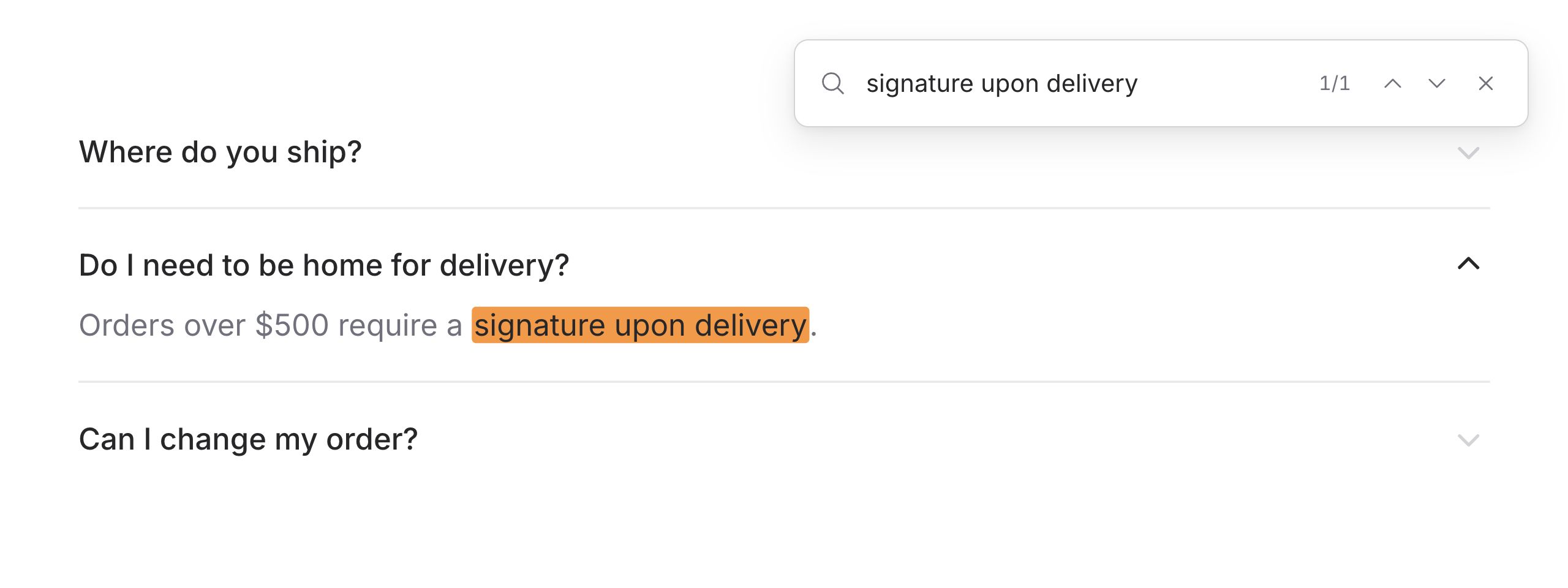
Imagine a user presses ⌘F to find some text on a page. The text is there, but it's tucked inside a closed accordion or an inactive tab.
Normally, they're out of luck. Because that content is hidden, the browser can't find it.
Modern browsers now have an answer: hidden="until-found". It keeps content visually hidden while making it discoverable by the browser's find-in-page feature. When a match is found, the browser reveals the content, scrolls to it, and highlights the result.
We wanted Flux components to ship with this behavior out of the box.
Accordions just work
Collapsed accordion content is findable by default. There's no prop to add and nothing to configure:
Copy to clipboard
<flux:accordion> <flux:accordion.item heading="Do I need to be home for delivery?"> Orders over $500 require a signature upon delivery. </flux:accordion.item></flux:accordion>When a match is found, Flux opens the associated item automatically.
Opt in for tabs
Tabs are opt-in because inactive tabs often represent separate views where this behavior may not be desirable. Add findable to the tab group when you want their content included in browser search:
Copy to clipboard
<flux:tab.group findable> <flux:tabs> <flux:tab name="profile">Profile</flux:tab> <flux:tab name="billing">Billing</flux:tab> </flux:tabs> <flux:tab.panel name="profile">...</flux:tab.panel> <flux:tab.panel name="billing">...</flux:tab.panel></flux:tab.group>When a match is found, Flux selects the associated tab automatically.
That's it. Another thing you never have to think about—Flux takes care of it using modern browser affordances.
Enjoy!
August 10, 2026
Toggle
Version ^2.17.0

Flux now ships with a Toggle component: a compact, button-shaped control for turning settings and modes on or off. It's included in the free component set.
Copy to clipboard
<flux:toggle wire:model.live="fastMode" icon="bolt" tooltip="Fast mode" />Tooltips for context
Icon-only controls need a clear name. Add the tooltip prop to give people context on hover and provide an accessible name for screen readers:

Copy to clipboard
<flux:toggle icon="bolt" tooltip="Fast mode" />Custom colors
When the toggle is off, it renders the outline version of your icon. Turn it on and the solid version takes its place in your app's accent color. Use the color prop to customize that active color without changing the control surface:

Copy to clipboard
<flux:toggle icon="bolt" color="blue" checked /><flux:toggle icon="heart" color="red" checked /><flux:toggle icon="bell" color="amber" checked />Adding text
Pair an icon with a short visible label when a setting benefits from persistent context. The text stays neutral while the icon carries the active state:

Copy to clipboard
<flux:toggle icon="heart" color="red" label="Favorite"></flux:toggle>Stateful icons and labels
Some toggles need to communicate more than a simple on or off value. Give each state a distinct icon and label so users can tell at a glance which one is active:

Copy to clipboard
<flux:toggle on:icon="speaker-wave" off:icon="speaker-x-mark" on:label="Sound on" off:label="Sound off"/>
August 9, 2026
Richer select options
Version ^2.16.0
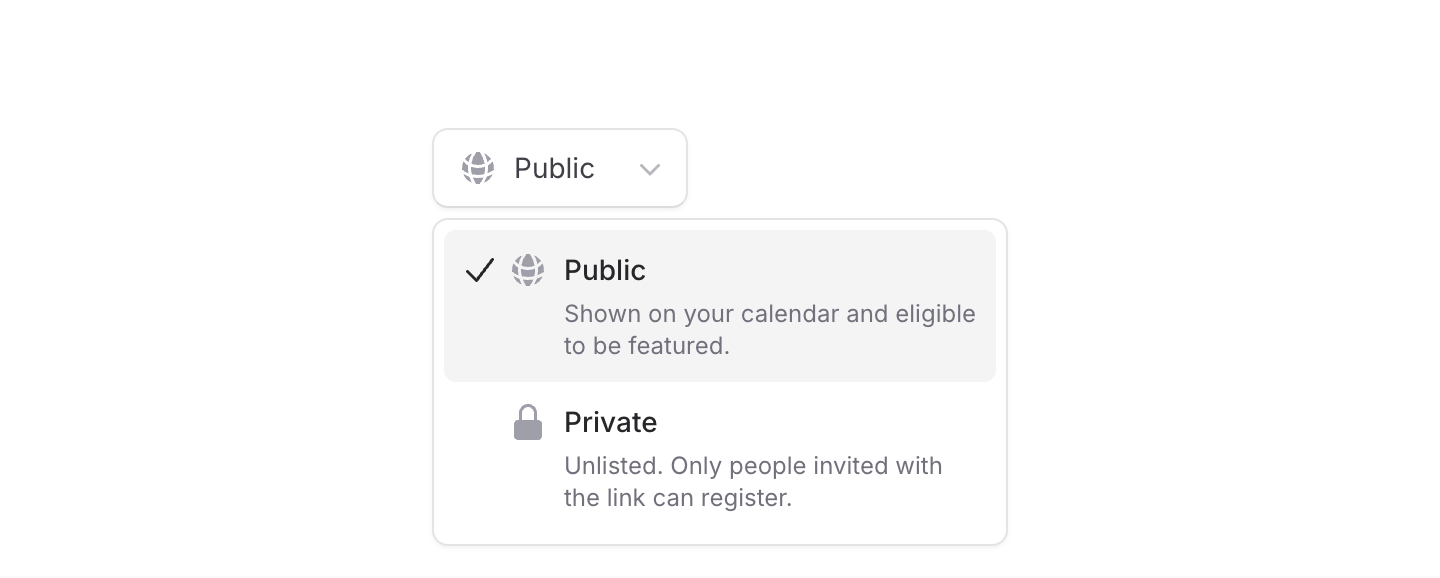
We've made a bunch of improvements to Select. Options can now have icons, descriptions, and avatars, and the dropdown itself can be positioned, aligned, and sized independently from the trigger.
Let's take a look.
Icons and descriptions
Add an icon to make options easier to scan, or a description when a label needs a little more context. You can use either on its own or combine them:
Copy to clipboard
<flux:select variant="listbox"> <flux:select.option value="public" label="Public" icon="globe-alt" /> <flux:select.option value="private" label="Private" description="Only invited users can access this." /></flux:select>Descriptions only appear while the dropdown is open, so the selected value stays nice and compact. Icons also support icon:variant and icon:class for further customization.
Avatars
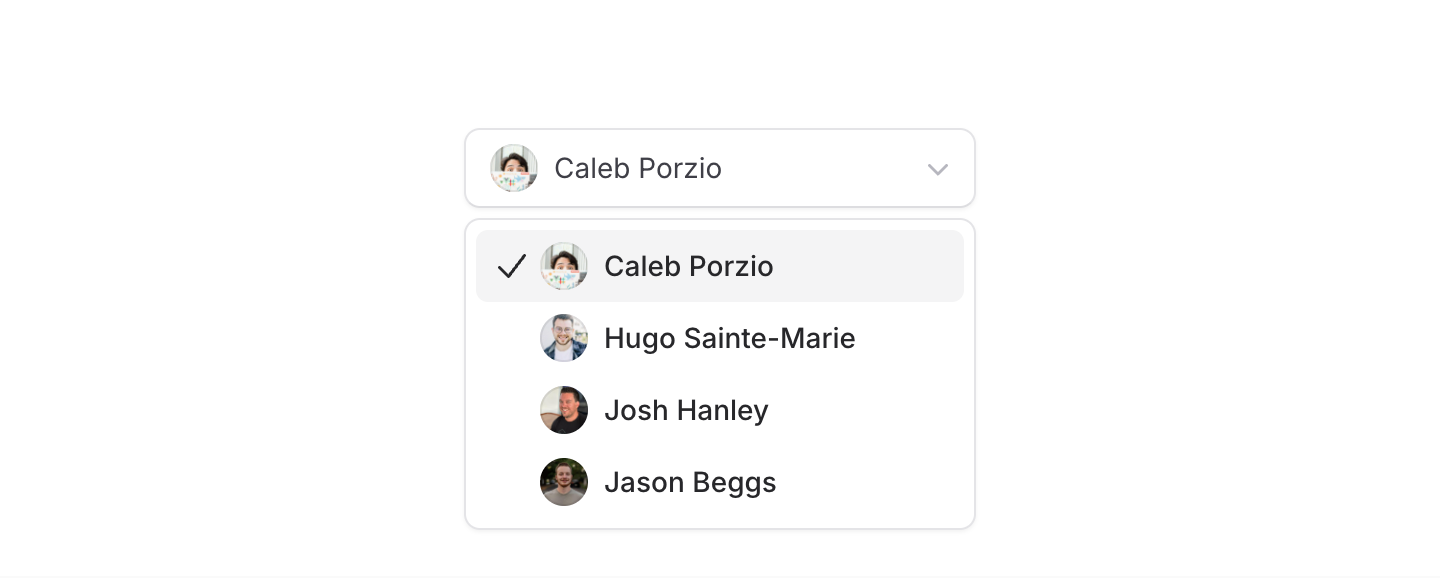
For user pickers, pass an image URL to the new avatar prop:
Copy to clipboard
<flux:select variant="listbox" wire:model="assignee"> <flux:select.option value="caleb" label="Caleb Porzio" avatar="https://unavatar.io/github/calebporzio" /> <!-- ... --></flux:select>You can pass avatar:* props straight through to the underlying Avatar component when you need more control.
Select components are one of the hardest things to get right in a UI kit, and we're proud of how flexible and capable Flux's select has become!